This is how to repair your Start Button that can`t function
*********************************************
Hi,
Thank you for being part of Windows 10.
I appreciate you for providing details about the issue and your effort towards resolving it.
Follow the below steps and check if it helps:
Open the Task manager. Here’s a tip:
Hi,
Thank you for being part of Windows 10.
I appreciate you for providing details about the issue and your effort towards resolving it.
Follow the below steps and check if it helps:
Open the Task manager. Here’s a tip:

Press CTRL+Shift+ESC.

Click File > Run New Task.
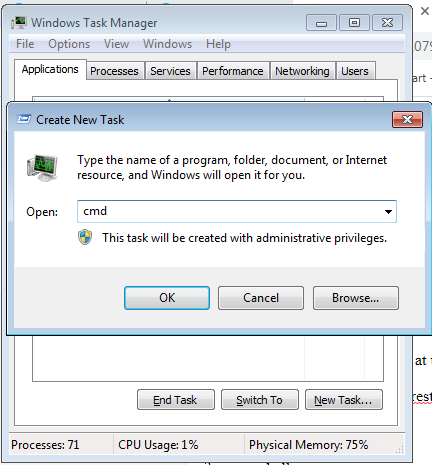
Make sure you have a
check mark beside “Create this task with administrative privileges”.
Type CMD. [ Enter ]

Command Prompt display
Type the following 4 commands at the CMD prompt:
1. dism /online /cleanup-image /restorehealth
2. sfc /scannow
3. powershell
4. Get-AppXPackage -AllUsers |Where-Object {$_.InstallLocation -like
"*SystemApps*"} | Foreach {Add-AppxPackage -DisableDevelopmentMode
-Register "$($_.InstallLocation)\AppXManifest.xml"}

copy one by one line command and paste to CMD [ Enter ]
repete this step for the 2nd line and so on...

Close the CMD window
Thank you.


No comments:
Post a Comment