Saturday, November 17, 2018

Unable to click Start Button on Windows

This is how to repair your Start Button that can`t function

*********************************************
Hi,

Thank you for being part of Windows 10.

I appreciate you for providing details about the issue and your effort towards resolving it.

Follow the below steps and check if it helps:

Open the Task manager. Here’s a tip: 


Press CTRL+Shift+ESC.


Click File > Run New Task.
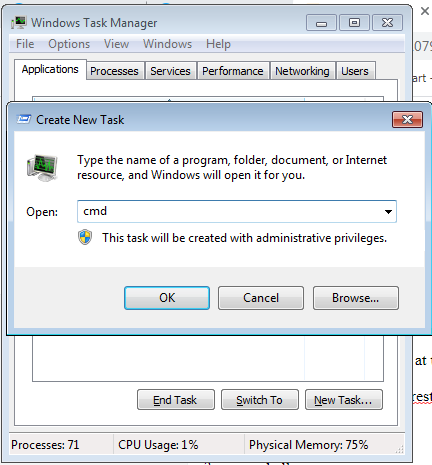


Make sure you have a check mark beside “Create this task with administrative privileges”.

Type CMD. [ Enter ]


Command Prompt display


Type the following 4 commands at the CMD prompt:

1. dism /online /cleanup-image /restorehealth

2. sfc /scannow

3. powershell

4. Get-AppXPackage -AllUsers |Where-Object {$_.InstallLocation -like "*SystemApps*"} | Foreach {Add-AppxPackage -DisableDevelopmentMode -Register "$($_.InstallLocation)\AppXManifest.xml"}


copy one by one line command and paste to CMD [ Enter ]
repete this step for the 2nd line and so on...


Close the CMD window

Thank you.


Thursday, August 30, 2018

I want to uninstall Microsoft Edge, Uninstall Microsoft Edge

This is by far the easiest way for you to do if you want to disable your Edge browser. Here is how you can do it:

1) Go to C:\Windows\SystemApps. Highlight the Microsoft.MicrosoftEdge_8wekyb3d8bbwe folder.

2) Right-click the Microsoft.MicrosoftEdge_8wekyb3d8bbwe folder and click Rename.

3) We rename it here as Microsoft.MicrosoftEdge_8wekyb3d8bbweold.

4) Click Continue.

5) There, your Edge browser should be disabled.

if you want your Edge back, just change the folder name back.


2: I want to uninstall Microsoft Edge

1) On your keyboard, press the Windows logo key and S at the same time, type powershell and click Windows PowerShell.

2) In the pop-up blue window, type in the following command:

get-appxpackage *edge*

When you are sure that you have made no typo, hit the Enter button on your keyboard.

3) You’ll be able to see the detail location of your Microsoft Edge.

4) Type “remove-appxpackage” in the Powershell window. Hit the Space button on your keyboard. Then copy the address next to the item PackageFullName and paste it after the command you just typed in. You can check the screenshot if you are not sure about it.

5) There you go. Your Edge browser should be removed now.


If you have the latest build of Windows 10, this method might not work as expected. If that is the case, you should go back to option 1 and disable Edge instead of removing it.


Wednesday, August 29, 2018

Panasonic KXP 1121e driver for Windows

Panasonic KXP 1121e driver


Its realy hard to find the right driver for it, this driver are rare to find , i have found it and upload here for you.

Driver for manual insert Panasonic KXP 1121e

https://drive.google.com/open?id=13Lh7cfjTzRo-Fcu0bHAwf5cfkMKtOLYG

Speed charge your Hand Phone trough your USB on Computer

Charger tool software for Desktop PC or Notebook

some time we cant charge usb to our device
but this software manage to increase voltage to the USB it self and anable to used it for charge our device

https://drive.google.com/open?id=1O_stRmY0IE-nOXahQDabTIIM-fMZ7-eZ

Cam Software for notebook and computer

Cam tool
Cool and nice software for Notebook cam tool

https://drive.google.com/open?id=1TrGbD_qYqbTb8y78EgXUbWvknAikwhCg

ADFU file for Alcatel One Touch Y800

ADFU file for Alcatel One Touch Y800


firmware reset for Alcatel
download at this link
https://drive.google.com/open?id=1TPyws1EMS7dXjRUbHAK2JTRQwEzeqK3y

Thursday, November 9, 2017

My sound card is not function after i install new graphic card

My sound card is not function after i install new graphic card
After i have blog a forum
i have found the solved problem
1) Enter BIOS - restart hit F2 or F10 depend on what bios.
2) Then find the chipset setting for sound on board.
3) Enable the function and save (hit F10) , save and exit.
4) then restart, after a while the conflict will be ok.


Good luck guys. hope this will solved your problem.
Kept in mind don`t search and install any driver other than windows detacted, it might be BSOD (Blue Screen Of Death) occur.

Sunday, October 15, 2017

APN setting for phone

Setting APN (acess Oint Network) for your phone.

i have case study for several telco and this is the best APN setting that i have try:


1) APN Name : att.mvno
    APN Insert  : att.mvno
    User id         :
    Password     :

2) APN Name : CINGULAR
    APN Insert  : CINGULAR
    User id        : WAP@CINGULARGPRS.COM
    Password    : CINGULAR1
              OR
    APN Name : cingular
    APN Insert  : cingular
    User id        : wap@cingulargprs.com
    Password    : cingular1
              OR
    APN Name : cingular
    APN Insert  : cingular
    User id        : wap@cingular.com
    Password    : cingular1

3) APN Name : Yes 4G
    APN Insert  : yesnet
    User id         :
    Password     :
            OR
    APN Name : Yes 4G
    APN Insert  : bistarinet
    User id         :
    Password     :

4) APN Name : Orange
    APN Insert  : internet
    User id         :
    Password     :


Monday, July 24, 2017

How to remove manually print job on printer

If you have tried to delete your print jobs in the print queue and restarted your computer but the same print job will not go away please try the following.   The following method will also work if you do not want to restart your computer.

XP
Click Start
Run
Type "NET STOP SPOOLER" (without the quotes, not case sensitive)
Open My computer
Browse to c:\windows\system32\spool\PRINTERS
Delete all of the .SPL and SHD files you find in this folder (do not delete the PRINTERS folder, just its contents)
Click Start
Run
Type "NET START SPOOLER"
Check your printer queue and all of the print jobs should have been delete.

Windows 7
Click on Windows logo/orb
In the search box type "NET STOP SPOOLER" (without the quotes, not case sensitive)
Browse to c:\windows\system32\spool\PRINTERS
Delete all of the .SPL and SHD files you find in this folder (do not delete the PRINTERS folder, just its contents)
Click on start button/Windows logo
In the search box type "NET START SPOOLER" (without the quotes, not case sensitive)
Check your printer queue and all of the print jobs should have been delete.

Please Restart after you have done it all above.
Good luck

Wednesday, September 14, 2016

Increase the 10 connection limit on Windows LAN

How to Increase the 10 Connection Limit on a Windows LAN


Alrighty, first a few more words about Windows Networking. If a computer is running Windows XP Home, the max number of connections that can be made to/from that computer on the LAN is 5. If the machine is running XP Pro, Vista, etc. then the max is 10.
Also, you have to understand that the limit refers to connections, not number of computers. Technically, you can have a LAN with 500 Windows machines, and as long as no more than 10 computers are trying to connect to any other computer, everything will work okay. But you will still probably have a few headaches like when you browse Network Neighborhood, not all the computers will show up. That’s pretty annoying.
So now, here’s how you fix it:
First, type Win-R to open the “Run” dialog box, and type gpedit.msc.
At this point, one of two things will happen:
  1. You have a fancier version of Windows, so a nice management console will pop up.
  2. You have a less fancy version of Windows, so it will give you an error message.
If you see the management window, then navigate thisaway:
Computer Config -> Windows Settings -> Security Settings -> Local Policies -> Security Option
And set Interactive Logon to 50 (the maximum) or 0 (i.e. disable caching completely)
If you get the error message instead of the management window, then do the following:
  • Type Win-R
  • Type regedt32 and hit Enter
  • Search for the following entry:
    HKEY_LOCAL_MACHINE\Software\Microsoft\Windows NT\CurrentVersion\Winlogon\CachedLogonsCount
  • Change CachedLogonsCount to 50 (the max) or 0 (disabled)
  • Close the Registry Editor


Monday, September 8, 2014

FREE ONLINE MOVIE PORTAL

FREE ONLINE MOVIE PORTAL

BORING WITH YOUR LIFE ONLINE ?

RELAX AND HAVE A LOOK AT THIS NOW PORTAL , JUST TO REMIND YOU NEED A GOOD LINE STREAM TO WATCH IT. HAVE A NICE DAY AND HAVE A NICE SHARED.
for HD movie you need at lease 4mbps speed line


LINTAH  DARAT TV portal

Trade with aicomodo

Make a profit true AI trade and its auto You will be paid constanly 0.5% ~ 0.8% per trade and depand on your deposit below are my account da...

LinkWithin

Related Posts Plugin for WordPress, Blogger...